

 By Emmanuel Bamfo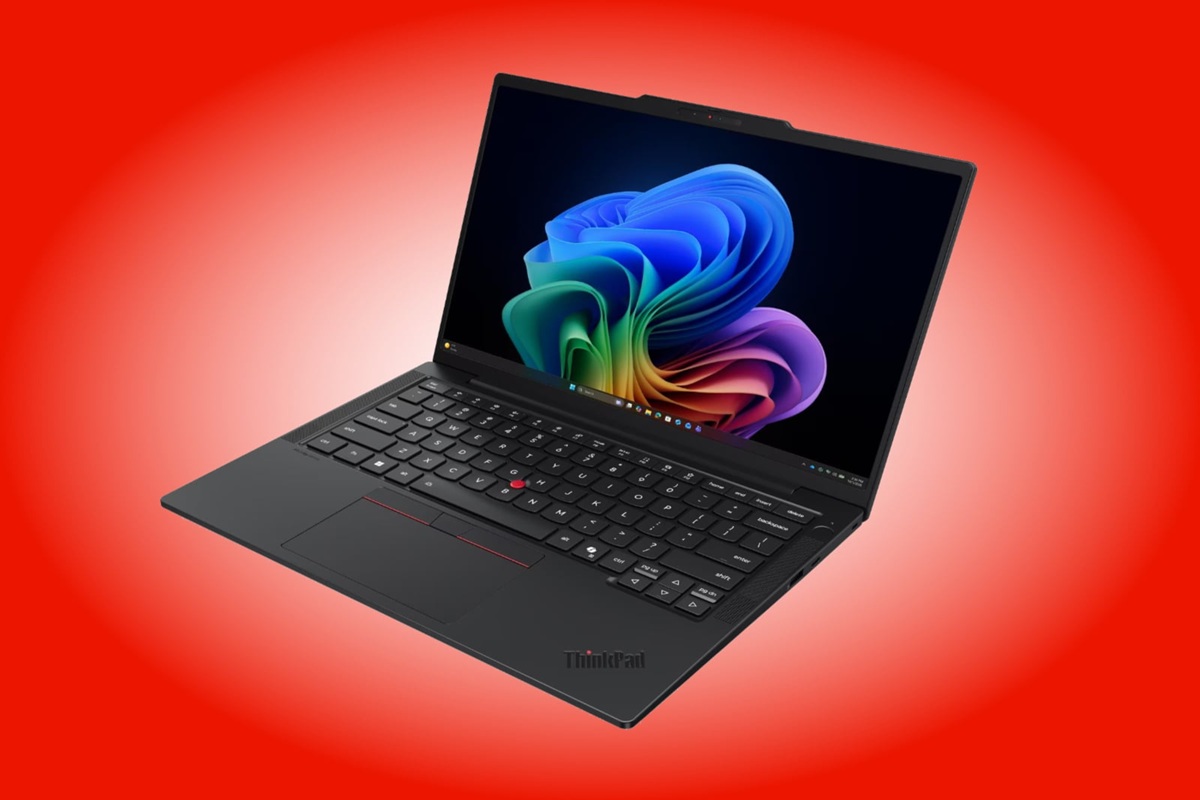
Imagine walking into a crucial business meeting at Airport Residential Area in Accra, opening your laptop, and watching the battery icon flash red within twenty minutes. Carrying around heavy charger bricks and hunting for wall sockets in congested cafes or offices can ruin your productivity fast. Fortunately, Lenovo has officially released the new ThinkPad T14s Gen 7 Snapdragon edition globally, offering a lightweight, hyper-efficient ARM-based power machine designed to end battery anxiety completely.
This comprehensive guide breaks down everything you need to know about Lenovo’s latest flagship business laptop powered by Qualcomm’s cutting-edge Snapdragon X2 architecture. We will explore its raw computing performance, revolutionary battery efficiency, display options, enterprise-grade security features, and realistic value for working professionals.
Is Lenovo’s New Snapdragon X2 ThinkPad Really Worth Your Money?
Lenovo’s new ThinkPad T14s Gen 7 Snapdragon is definitely worth your investment if you demand extreme mobility, multi-day battery life, and high-speed AI processing. It combines a premium sub-1.2 kg carbon fiber chassis with Qualcomm’s fastest ARM processors to deliver desktop-class responsiveness on the go.
For years, business executives and digital creators had to choose between thin laptops that overheat quickly or heavy workstations that drain power in three hours. Lenovo solves this frustrating tradeoff by pairing Qualcomm’s second-generation Snapdragon X2 silicon with ThinkPad’s famous industrial engineering.
The laptop targets mobile workers who constantly move between client sites, airports, and remote desks. Instead of lugging around extra cables, you can easily pull off a full workday of heavy multitasking, video conferencing, and document drafting without looking for a power outlet.
While traditional x86 laptops struggle with high idle power consumption when suspended, this ARM-powered machine handles sleep modes efficiently. You open the lid and instantly start working without waiting for slow boot sequences or system lag.
What Makes the Snapdragon X2 Elite and X2 Plus Chips So Fast?
The new Snapdragon X2 Elite and X2 Plus processors deliver outstanding computing power by combining twelve high-efficiency CPU cores with ultra-fast LPDDR5X-9600 memory architecture. The top-tier Snapdragon X2 Elite X2E-80-100 reaches single-core turbo clock speeds up to 4.7 GHz and dual-core speeds up to 4.4 GHz.
Qualcomm designed these second-generation ARM SoCs specifically to rival top-end Intel Core Ultra and AMD Ryzen processors while consuming significantly less energy. The Snapdragon X2 Elite packs a 34MB cache alongside an integrated Qualcomm Adreno GPU to render crisp visuals and smooth graphics.
For budget-conscious business buyers, Lenovo also offers the Snapdragon X2 Plus X2P-42-100 configuration. Real-world performance benchmarks reveal only about a 20% gap in raw processing power between the Elite and Plus variants. That small performance gap makes the Snapdragon X2 Plus model an amazingly smart buy for daily office productivity.
Both processor tiers handle demanding tasks like compiling code, processing massive spreadsheets, and transcoding 4K video files effortlessly. You get fluid performance without fan noise distracting everyone around you in quiet boardrooms.
How Heavy Is the ThinkPad T14s Gen 7 and Will It Break Your Back?
The ThinkPad T14s Gen 7 Snapdragon weighs a mere 1.19 kilograms (2.56 lbs), making it one of the lightest 14-inch enterprise laptops available today. Its featherlight build ensures you can carry it around all day in your backpack or briefcase without feeling any physical strain.
To achieve this impressive weight reduction without sacrificing structural integrity, Lenovo constructed the top lid using carbon fiber reinforced plastic (CFRP) and the bottom chassis using recycled aluminum. This hybrid material approach gives the notebook exceptional rigidity and a premium matte black tactile feel.
Despite its sleek 10.7mm front profile, the laptop undergoes rigorous MIL-STD-810H military-grade durability tests. It easily survives accidental drops, harsh vibrations, high temperatures, humidity, and dusty environments without cracking under pressure.
You do not need to worry about delicate handling when rushing through busy streets or taking public transit. The rigid palm rest and refined keyboard frame prevent deck flex, ensuring long-lasting durability for frequent business travelers.
Can This Laptop Handle All-Day Work Without a Charger in Ghana?
Yes, the ThinkPad T14s Gen 7 easily lasts through an entire workday and beyond thanks to its energy-thrifty 58 Wh lithium-polymer battery and ultra-efficient ARM architecture. Users can comfortably stream video, browse dozens of web browser tabs, and edit documents for over 15 to 20 continuous hours on a single charge.
In regions where unexpected power outages or dumsor occur, having a laptop that survives long blackouts is a absolute lifesaver. Traditional x86 laptops dump massive amounts of power as waste heat, but ARM architecture executes instructions with surgical thermal efficiency.
Lenovo bundles a compact 65W USB-C GaN power adapter that recharges the 58 Wh battery rapidly. Plugging the laptop in during a quick 30-minute lunch break delivers hours of operational battery life to get you through late-night shifts.
Furthermore, the soldered LPDDR5X-9600 memory modules operate at lower voltages compared to older DDR5 sticks. This low power drain extends standby times dramatically, preventing battery drain while your machine rests inside your bag.
Which Screen Option Should You Choose for Work and Content Creation?
Lenovo offers two distinct 14-inch WUXGA (1920×1200) IPS anti-glare display panels, allowing you to select between a touch-enabled screen or an sRGB-accurate bright display. Your choice depends on whether you prioritize interactive touchscreen convenience or visual color accuracy for creative work.
The base display panel features in-cell touch support with 400 nits peak brightness and 45% NTSC color gamut coverage. This touchscreen option works nicely for general office tasks, signing PDF documents, and navigating Windows 11 with quick finger taps.
However, if your daily work involves photo editing, graphic design, or watching media content, you should choose the non-touch 500-nit panel. This upgraded display boasts 100% sRGB color gamut coverage and dynamic brightness boost technology, delivering vivid colors and razor-sharp readability outdoors under direct sunlight.
Both panel variants feature 16:10 aspect ratios with an impressive 88% screen-to-body ratio. The extra vertical screen real estate lets you view longer documents and split-screen apps without constantly scrolling.
How Does the Integrated NPU Power Copilot+ and AI Workloads?
The integrated Qualcomm Hexagon NPU delivers up to 80 TOPS (Trillions of Operations Per Second) of dedicated neural processing power to run complex AI tasks locally on your device. This massive AI compute capability easily exceeds Microsoft’s strict Copilot+ PC requirements for next-generation Windows features.
Having an 80 TOPS NPU means your laptop handles generative AI functions, real-time audio translation, and automated image generation without sending private data to cloud servers. Processing AI requests locally preserves battery life and protects confidential corporate data from potential cloud breaches.
Windows 11 Pro on ARM leverages this NPU for advanced features like live captions with instant translation, studio video effects, and intelligent eye-contact corrections during video calls. Lenovo also includes its proprietary Lenovo AI Now software to optimize system performance automatically based on your usage patterns.
Furthermore, the dedicated NPU offloads heavy AI tasks directly from the main CPU cores and Adreno GPU. This smart workload distribution ensures your computer stays lightning fast even while running background machine learning background processes.
What Ports and Connectivity Features Do You Get for Business Use?
The ThinkPad T14s Gen 7 Snapdragon offers a surprisingly complete array of physical ports and modern wireless features, including dual USB4 40Gbps Type-C connections and Wi-Fi 7 compatibility. You get full workstation connectivity without carrying clunky dongles or expansion hubs.
On the sides of the chassis, Lenovo provides two USB4 40Gbps ports supporting Power Delivery and DisplayPort 1.4 video output. You also get one full-sized HDMI 2.1 port capable of driving 4K external monitors at 60Hz, a USB-A 5Gbps port with Always-On charging, and a 3.5mm headphone combo jack.
Wireless connectivity is handled by Qualcomm’s Wi-Fi 7 NCM825A module alongside Bluetooth 5.4. Wi-Fi 7 delivers ultra-fast data transfer speeds and reduced network latency, keeping your video streams crystal clear even on crowded public wireless networks.
For remote collaboration, the laptop features a 5.0-megapixel IR camera with a physical ThinkShutter privacy slider and dual-array noise-canceling microphones. Computer Vision human presence detection automatically locks your screen when you step away and unlocks it seamlessly via Windows Hello when you return.
Should You Buy the Snapdragon X2 Plus or Snapdragon X2 Elite Version?
Selecting between the Snapdragon X2 Plus and Snapdragon X2 Elite models depends strictly on your performance needs and budget constraints. Most regular business users will find the Snapdragon X2 Plus configuration perfectly suited for daily workflows, saving significant cash in the process.
The Snapdragon X2 Plus X2P-42-100 model comes configured with 16 GB of LPDDR5X-9600 RAM and a 256 GB or 512 GB PCIe Gen4 SSD. It effortlessly handles web browsing, Microsoft Office 365 apps, accounting software, and video conferencing while preserving maximum battery life.
On the other hand, power users, software developers, and data analysts should choose the Snapdragon X2 Elite X2E-80-100 variant. This flagship configuration includes 32 GB of RAM and up to a 1 TB SSD, giving you the memory bandwidth required for virtualization, heavy multitasking, and huge data analytics.
Because benchmark results demonstrate roughly a 20% performance variance between both variants, paying a massive premium for the Elite chip is only necessary if your daily apps explicitly demand maximum multi-threaded performance.
How Much Does the Lenovo Snapdragon X2 ThinkPad Cost Globally?
Global retail pricing for the ThinkPad T14s Gen 7 Snapdragon starts around $1,719 USD in North America, £1,909 in the United Kingdom, and €2,009 to €2,280 across European markets. Pricing varies based on processor tier, memory capacity, storage size, and display panel choices.
The base entry configuration featuring the Snapdragon X2 Plus processor, 16 GB of soldered RAM, a 256 GB M.2 2242 PCIe SSD, and a 400-nit touchscreen panel sits at the starting price point. This configuration offers the most accessible entry point into high-efficiency Copilot+ business computing.
Upgrading to the premium Snapdragon X2 Elite configuration with 32 GB of RAM, a 1 TB PCIe 4.0 NVMe SSD, and the superior 500-nit 100% sRGB display pushes prices up to around £2,500 to £2,690 in Europe.
While these prices firmly position the notebook in premium enterprise territory, the long-term battery savings, physical durability, 3-year warranty coverage, and high resale value justify the upfront cost for serious business professionals.
What Are the Final Verdicts for Frequent Travelers and Professionals?
The Lenovo ThinkPad T14s Gen 7 Snapdragon stands as a monumental step forward for ultraportable enterprise computing. It successfully delivers real-world multi-day battery endurance, whisper-quiet operation, robust build quality, and cutting-edge 80 TOPS AI acceleration in a sleek 1.19 kg chassis.
Before making your purchase, ensure that your core software applications run natively on Windows 11 Pro on ARM64. While Windows 11’s Prism emulation layer translates traditional x86 applications smoothly, native ARM64 applications deliver the best possible speed and energy efficiency.
If you spend your workdays moving between client offices, airports, and coffee shops, this laptop will completely eliminate your dependence on wall outlets. Lenovo has engineered an exceptional Copilot+ PC that redefines what mobile professionals should expect from modern ultrabooks.
Also Read: afenyo markin donates laptops to winneba police to boost security