

 By Emmanuel Bamfo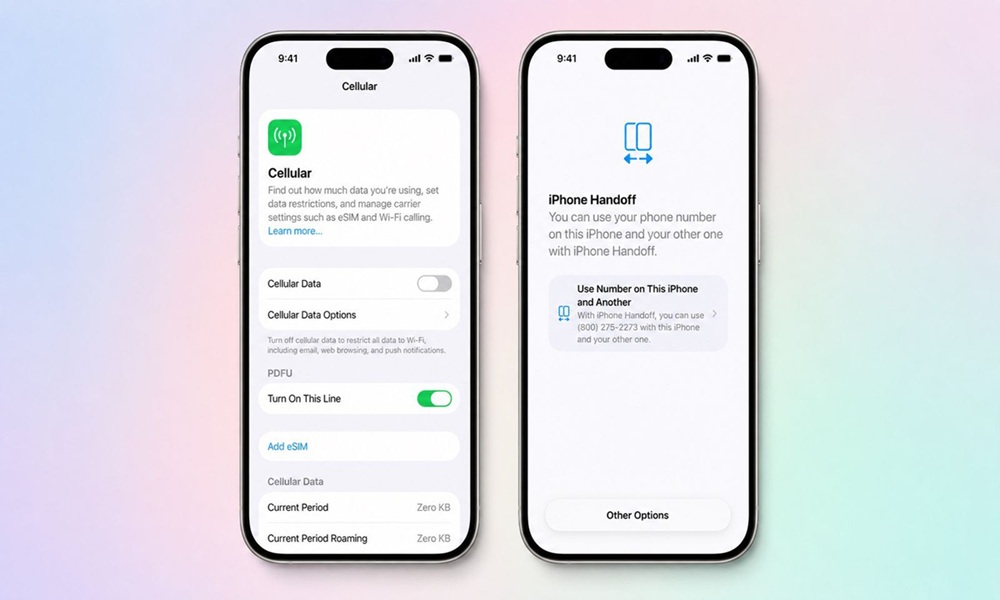
Smartphone users carrying multiple devices have long struggled with the headache of moving phone numbers or swapping physical chips back and forth. Apple is finally addressing this major frustration with the launch of iOS 27, introducing a clever system that lets you share one single number across two separate iPhones. If you are tired of missing important calls because your secondary device lacks your main line, this update changes everything.
Why should you trust this deep dive? As a senior tech strategist who has spent over ten years tracking mobile software evolution and testing developer betas, I cut through the marketing noise to give you clean, practical facts. We will look at how this ecosystem shift works under the hood without confusing tech jargon or dry corporate talk.
How Does The New iPhone Handoff Actually Work On iOS 27?
The groundbreaking iPhone Handoff feature in iOS 27 allows users to share a single phone number between a main device and a secondary companion phone using dual eSIM architecture. Apple’s underlying framework coordinates this process so that only one enrolled iPhone remains active on cellular networks at any given time.
Rather than cloning your active line onto two simultaneously ringing devices, the system lets you toggle active and passive states directly through your cellular settings. Your primary eSIM stays securely on your main daily driver, while the secondary handset receives a linked companion eSIM. This means you can leave your heavy flagship at home, grab a smaller or older iPhone for a quick evening walk, and still receive every call without forwarding hassles.
Why Do Multi Phone Users Desperately Need This Feature Today?
Carrying two phones for work and personal use or switching between a standard model and a specialized device has traditionally required constant manual SIM transfers. Consumer data from global mobile device studies highlights that over twenty percent of urban professionals regularly juggle more than one smartphone throughout their daily routine.
Manually moving cellular profiles or paying for two separate monthly carrier plans wastes both time and hard-earned money. The new iOS architecture solves this pain point cleanly by bridging multiple handsets under one unified digital identity. You keep your primary contacts, messages, and calls accessible no matter which device you pull out of your pocket.
What Are The Setup Requirements For Managing Your Cellular Connection?
Setting up this multi device link happens directly inside the iOS 27 settings menu under the main cellular configuration tab. Apple requires users to designate one handset as the primary device during initial configuration, which then governs overall network permissions and carrier controls.
Location sharing dynamically updates based on whichever specific iPhone is actively handling your phone number at that exact moment. Carrier compatibility remains a vital piece of the puzzle, with early network testing indicating that major global operators like T-Mobile and Deutsche Telekom are leading rollout support. Checking with your local telecom provider ensures your specific account profile supports companion eSIM provisioning before you attempt the upgrade.
How Does This Feature Protect Your Personal Data and Device Safety?
Using a secondary companion phone for outdoor trips or busy market runs keeps your sensitive banking apps and primary personal files safely locked on your main device. Industry security reports emphasize that minimizing the exposure of your primary handset significantly reduces risks tied to theft or accidental damage in crowded public spaces.
If your secondary device gets lost while you are moving around town, your primary line remains secure and your core financial apps stay protected at home. You can easily deactivate the companion profile remotely through your iCloud account without losing access to your main cellular line. It provides peace of mind for anyone navigating busy streets who wants convenience without compromising digital security.
What Else Can You Expect When You Upgrade To iOS 27?
The official public rollout of iOS 27 brings a massive wave of system enhancements alongside the multi phone handoff capability. Apple’s software schedule points to a mid-September release window, following months of rigorous developer testing and stability refinements.
Performance metrics show faster app launch speeds, smarter Spotlight indexing, and improved battery management tools designed to keep your hardware running cool. Whether you are eyeing the latest hardware releases or refreshing an older device already sitting in your drawer, this software generation redefines how mobile ecosystems operate. Updating your device gives you immediate access to tools that make everyday digital life smoother and much more efficient.